Introduction: I am a dev in a digital bunker
I am a developer in an environment that many would describe as a “digital bunker.”
No GitHub Copilot, no ChatGPT, no cloud services.
Everything is filtered, logged, monitored. Internet access is either non-existent or locked behind a proxy whose rules or exceptions I have no control over.
However, like many, I enjoyed the comfort of AI assistants: test generation, code explanations. And going back hurts. We lose autonomy.
The problem is simple to formulate:
How can you regain the efficiency provided by modern AI assistants without violating security regulations or extracting sensitive data?
This article is the story of this research: how, as a developer in a restricted context, I rebuilt a 100% local AI support environment, based on a simple architecture and a few software building blocks: local models, AI server, AI server, web interface, IDE integration.
I. Technological isolation of the developer in a restricted environment
1.1. The constraints of a closed environment
In some contexts, constraints are not negotiable:
- Sensitive public sector: ministries, defense, justice,...
- Critical businesses: banks, insurance companies,...
- Secure environments: clean rooms, closed networks,..
Concretely, this gives:
- Strict network blocking: no HTTP calls to the outside.
- Legal or contractual prohibition to release data (health data, personal data, industrial secrets).
- External accounts blocked: you cannot use your GitHub, Google, Microsoft account to connect to third-party services.
As a result, all “modern” cloud tools suddenly become unavailable to us.
1.2. The need for local autonomy
If I want to benefit from AI assistants, I have to host them myself (on my computer or on an internal server), I have complete control of where the data goes (ideally: never take it off the network). Finally, I must not depend on an external service that can be cut off or banned overnight.
The objective then becomes to recreate a Copilot/ChatGPT-Like locally, in a controlled framework, in accordance with security and confidentiality constraints.
So the needs are pretty clear. I want a chat assistant to ask questions, ask for explanations, prototype text or code. Then I need direct integration into the IDE for completion, refactoring, test generation. All this while ensuring that the data does not come out: everything must run on the machine or on an internal server.
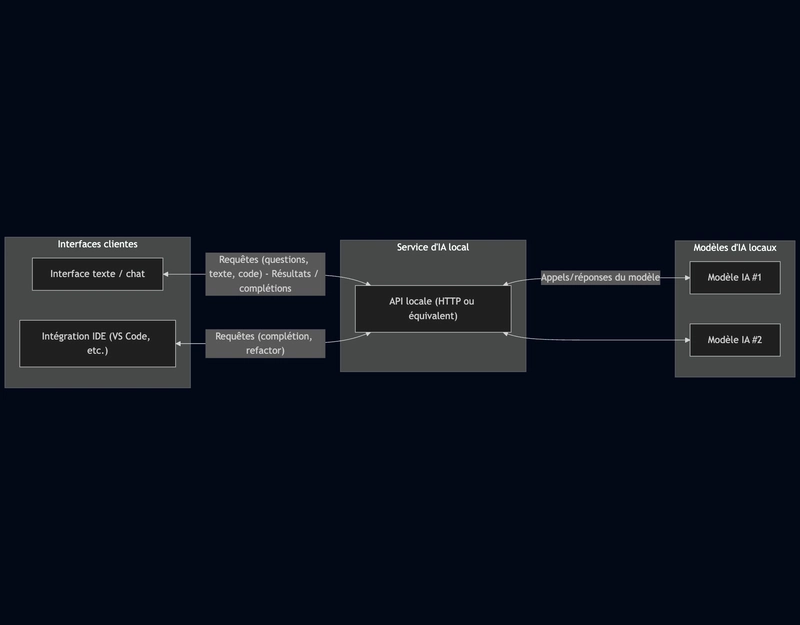
The answer to these needs is a local-first architecture:
- One or more AI models hosted locally (on the computer or on an internal server).
- An AI service that exposes these models via a local API (HTTP or equivalent).
- One or more client interfaces:
- a text/chat interface to chat with the models;
- an IDE integration to assist code writing;
- No dependency on the cloud, no data that leaves the secure environment.
II. Implementation step by step: building your private AI environment
I am starting from a realistic situation: a dev position in a restricted environment, with access to an internal repository but no direct access to the Internet.
2.1. Choice of equipment
There are several possible configurations. First option, we are using CPU-only, a small machine (8 to 32 GB RAM). We can only use models with reduced parameters 7B to 70B.
Second option, we set up an internal server with GPUs. We thus have access to heavier models, better latency and sharing for several developers. This makes it possible to expose a centralized AI service within a secure internal network.
2.2. Installing and configuring tools
Local AI service
First step, we need to install the local model engine; a runtime that can load open-source models and expose them via a local API. Ollama is establishing himself as a leading figure in this field, in particular thanks to the numerous models available for download in his bookstore.
brew install ollama | apt install ollama
My need is twofold. I want a conversational model and a specialized code model.
ollama pull codellama:13b # Modèle code specific
ollama pull llama3.1:8b # Modèle conversationnel
Although downloaded, these templates are not yet available upon request. You have to launch the ollama server then launch the model on the server
ollama serve # Lance le serveur ollama
ollama run codellama:13b # Charge le modèle sur le serveur local ollama
(ollama run llama3.1:8b)
Now we can send requests to loaded models

Note: The models can be uploaded to an authorized network, then imported to the restricted network via internal procedures (secure USB key, controlled transfer, etc.).
Configuring the code assistant in the IDE
We want to configure a code assistant in our IDE that uses the specialized model on code previously launched via ollama. In my case, I am using VSCode and the Continue extension
The advantage is that it directly embeds the connection to Ollama, this makes its configuration trivial.
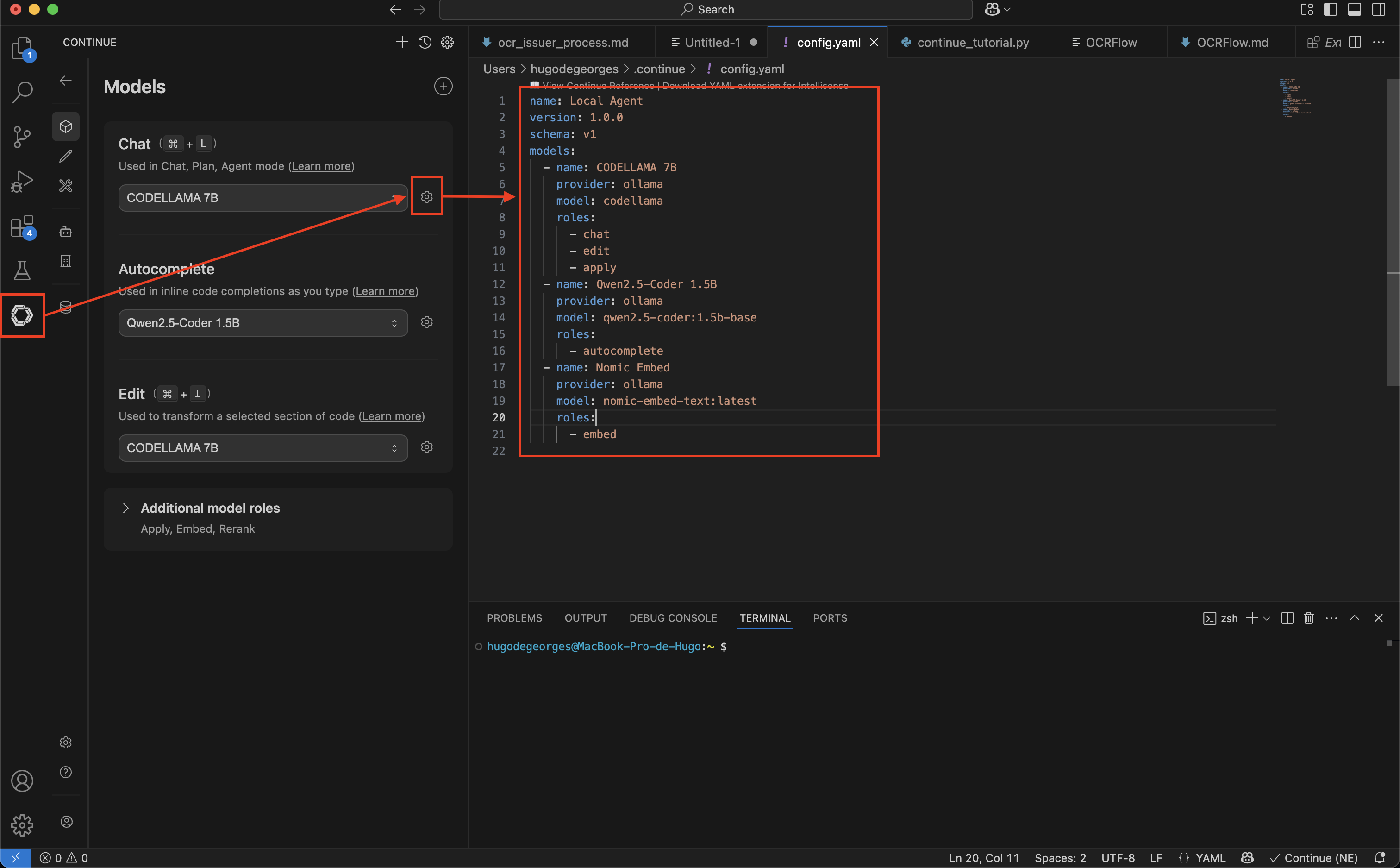
Several models can be defined for it according to the action carried out in the IDE (autocompletion, chat,...). For this we specify to him,
- The provider: Ollama
- The target model: Codellama
- The associated roles
Les Roles are used to assign the most effective AI model for each type of action in VS Code:
cat: It manages conversations in the sidebar to explain or generate code. It requires a “smart” model.Autocomplete: It suggests the end of the lines in real time. It requires a very light and fast model.Edit: It directly modifies or refactors a selected piece of code (viaCommand+I).Embed: It indexes files to allow the AI to search your entire code base.Apply: It manages the clean fusion of the code generated by the chat directly into the source files.
Text/chat interface
I use the platform OpenWebUI which offers an ergonomic conversation interface and native integration with Ollama. I am using the command given in the OpenWebUI README to launch in a local Ollama configuration.
docker run
	-d # Detached: lance le conteneur en arrière plan
	-p 3000:8080 # Mappe le port interne 8080 de docker sur le port 3000 de la machine
	--add-host=host.docker.internal:host-gateway # Elle permet au conteneur
	# (Open WebUI) de "voir" et de communiquer avec les services qui tournent sur
	# la machine (l'hôte), en dehors de Docker
	-v open-webui:/app/backend/data # créer un espace de stockage nommé open-webui géré par Docker
	--name open-webui # Nom du conteneur
	--restart always # Redémarrage automatique
	ghcr.io/open-webui/open-webui:main # Image d'OpenWebUI utilisée
The ollama interface is available on http://localhost:3000.
I set up OpenWebUI to use the llama3. 1:8 b model as a template.
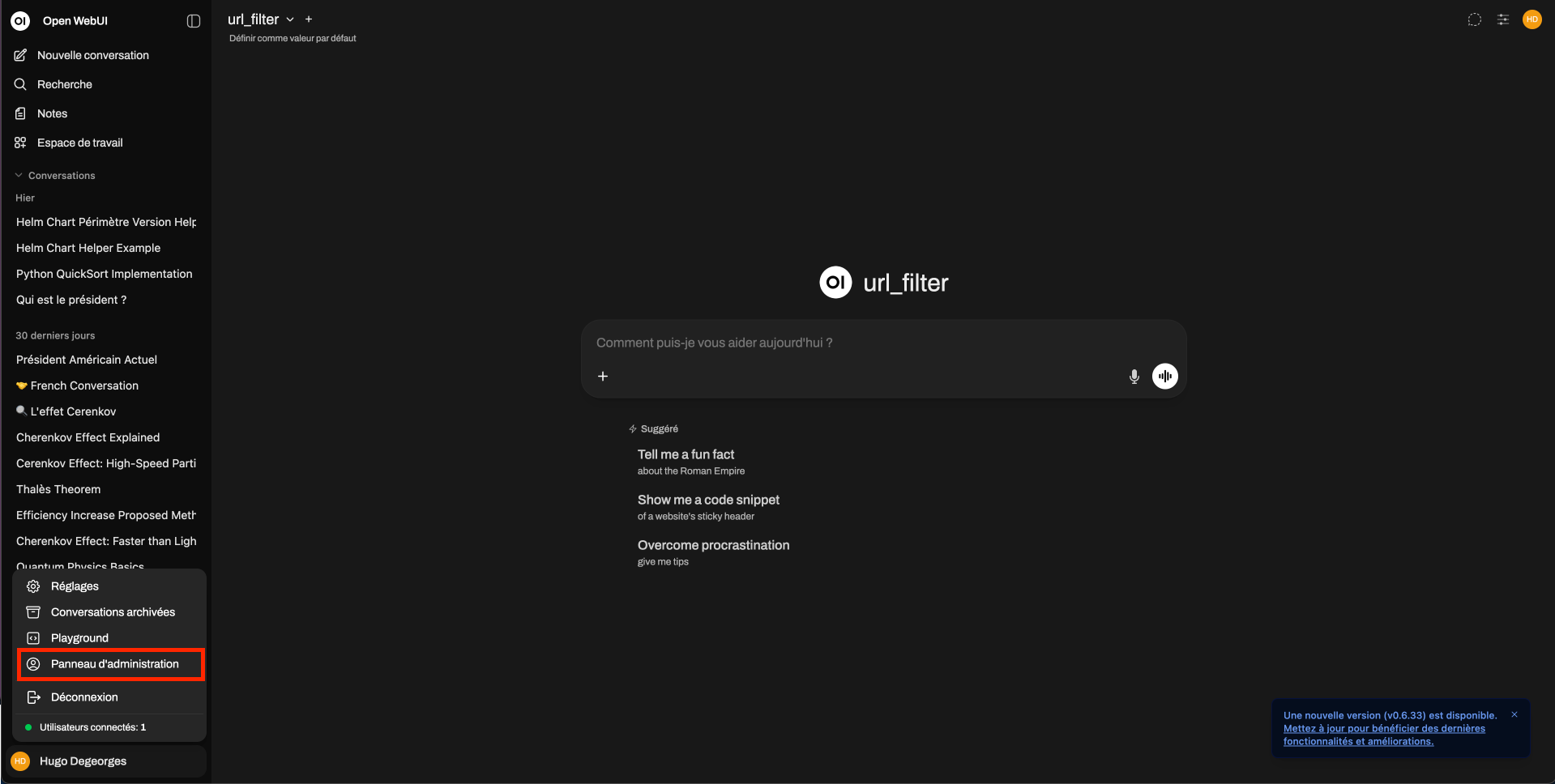
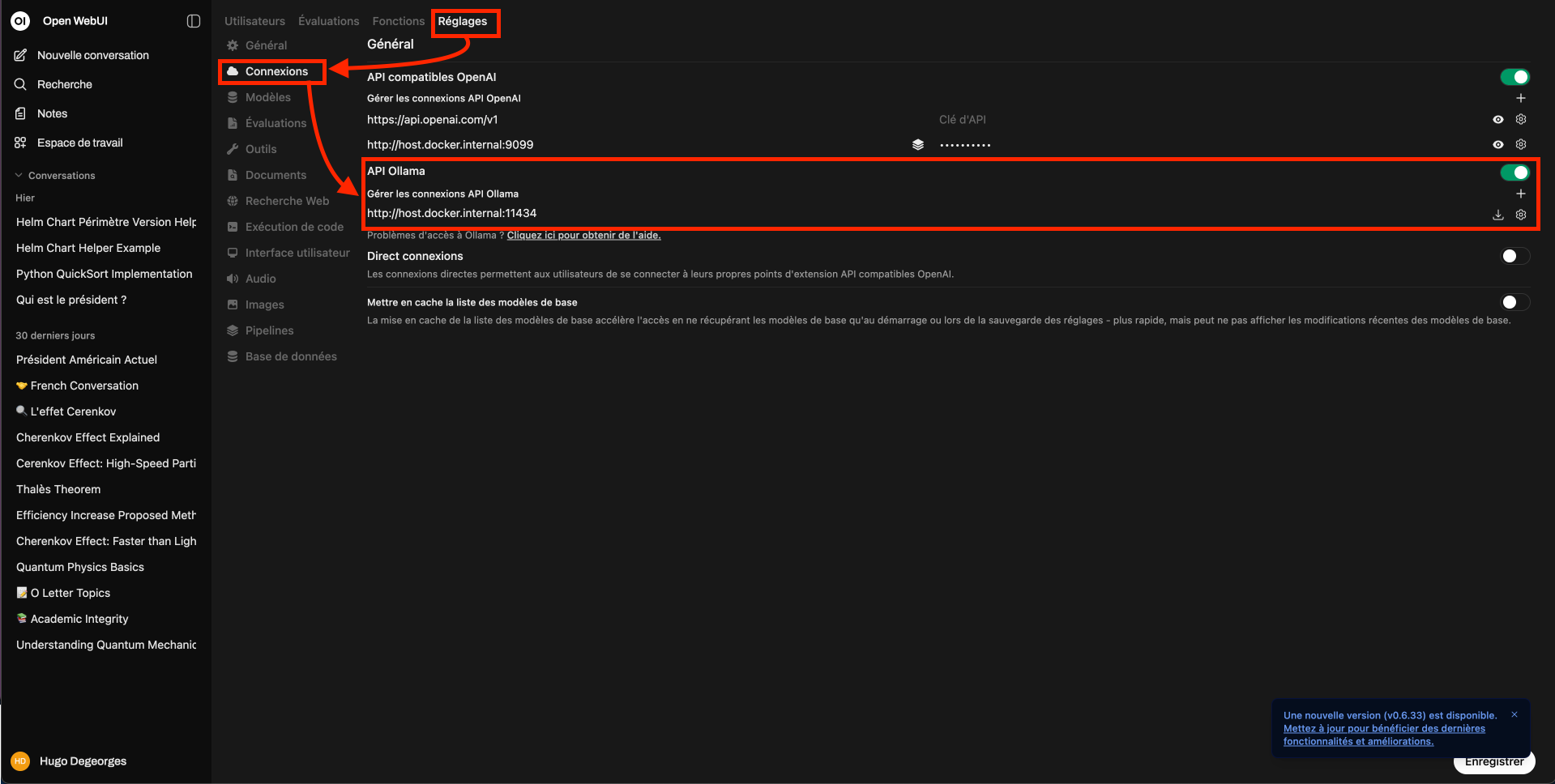
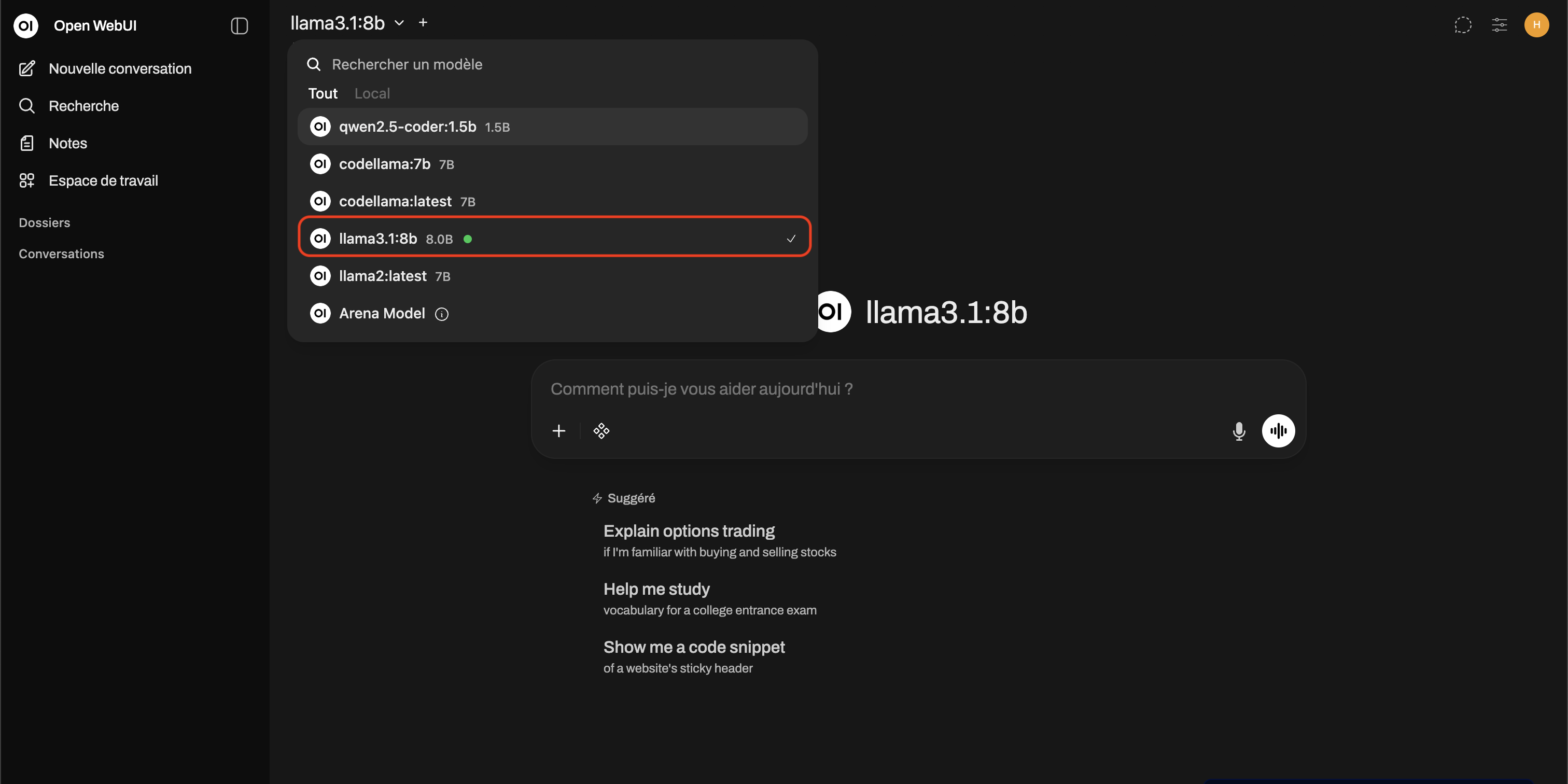
The chat interface is ready to use.
III. Concrete uses: regaining the “power” of an AI assistant
Once the infrastructure is in place, the question becomes: what is it really changing in my daily life as a developer?
Demonstration: The log “Sanitizer”
To prove the effectiveness of this local stack, let's take a concrete scenario. I need to develop a log anonymization script in accordance with a strict internal PSSI (Security Policy).
Here are the rules taken from the specification PDF document that I need to implement:
Rule 4.2: Anonymization of Emails. All email must be hashed (SHA-256) with salting via the environment key 'APP_SECRET'. Rule 4.3: IP anonymization. IPv4 addresses should be truncated (the last byte replaced by 0).
Step 1: Literature review
In a typical environment, I would have to read the whole document to find these rules. Here, I use OpenWebUI as a security analyst.
What's going on : I am loading the specification PDF directly into OpenWebUI. I then ask Llama 3.1 to extract only the technical constraints related to IPs and Emails. The model goes through the document, isolates rules 4.2 and 4.3, and provides me with a clear summary of expected implementations (salting, hashing, truncation).
The gain: I got the critical information without having to read everything and without any confidential data leaving my local network.
Step 2: The implementation in the IDE
Once the constraints are identified, I switch to VS Code for pure development, assisted by the Continue extension.
What's going on:
Skeleton generation: I am asking the Chat module to generate the LogSanitizer class. I provide him with the precise rules retrieved in the previous step. It literally translates the specification into Python code (hashing and truncation methods).
Intelligent autocomplete: This is where the specialized code model (CodeLama) takes over. It suggests the end of the lines, completes the imports, and helps me write the main block and the unit tests to verify that the IP is indeed truncated.
The result: In a few seconds, I get a working, tested, and security-compliant script, all without leaving my IDE.
Step 3: Documentation and compliance
The loop is not complete until the code is documented for listeners. The Chat model is a lot better writer than the Code model.
What's going on: I go back to OpenWebUI and provide it with the final generated code. I ask him to write a README.md for the security auditor. The AI analyzes the script and generates documentation that proves, point by point, that Rule 4.2 (Emails) and Rule 4.3 (IPs) are well respected in the implementation.
The gain: Traceability between the initial specification and the final code is ensured, with minimal writing effort.
IV. Best practices: making the most of local models
The main trap is to want “a big model who knows everything” and end up with a rowing machine and an unusable service.
4.1. Combining several small models rather than one giant
In a restricted context, the right strategy is specialization:
- A code-oriented model
- Optimized for completion, refactoring, test generation.
- A text/documentation-oriented model
- Trained for writing, reformulation, summaries.
Why opt for this strategy?
We reduce the load: not all uses need the largest model. We gain in speed because a small specialized model can respond much faster than a giant model. We also gain in memory optimization: not all models are loaded all the time, we choose according to need. The important thing is to choose the model according to the context: for the code, model A; for the doc, model B.
4.3. Security and confidentiality
The great strength of this local approach is mastery. We don't have any data that doesn't come out of the restricted network. The models and tools can be validated by the security teams before they are put into internal production. But that does not exempt us from good practices. We check that the logs do not contain sensitive data in plain text. Access to the AI service is limited to only authorized machines or users.
4.4. Possible optimizations
Once the base is in place, we can go further, in particular by specializing in our context via local indexing of internal documentation (RAG) We index the internal documentation, the wiki, specifications, procedures. The AI assistant then answers not only “in general”, but also based on the organization's documents.
V. Limits and perspectives
Nothing is magic. You have to be lucid about what local models bring... and what they don't (yet) bring.
5.1. Current constraints
The local constraint necessarily implies some limitations.
First, the local machines are “modest”, the latency can be high. The big open-source models remain greedy. Second, the context is limited. It is difficult to load large files, lots of docs, or long histories simultaneously. You often have to compromise on the size of the context.
Finally, updating models is more complicated without direct access to the Internet, this requires a specific process (download on an open network, validation, transfer to the restricted network).
5.2. What's coming: the future of sovereign AI
Despite these limitations, we remain optimistic. Open-source models are progressing rapidly, especially in terms of code. More and more public and private organizations are investing in local AI infrastructures: internal clusters, frameworks for deploying sovereign assistants, dedicated governance policies. Developers in restricted environments will no longer have the impression of being a generation behind schedule.
Conclusion: AI support in a closed world
Starting from a simple observation: I cannot use the cloud, but I need AI assistance, we can build a clear answer:
- a local-first architecture,
- an internal AI service,
- several specialized models,
- adapted interfaces: IDE, web.
It's not a perfect copy of what the cloud giants offer, and that's okay. It is adapted to the context, respectful of security constraints, and above all: it is under our control.
As a developer in a “digital bunker”, I am no longer a spectator of the AI revolution.